slam_toolbox ros2 패키지와 f1tenth particle_filter 패키지를 설치하려고 했다. 의존성(package dependency)에 따라 설치하던 중에 둘 다 설치하지 못했다.
작업 내용
1. slam_toolbox를 설치해보려고 했다. libceres1과 libceres-dev 패키지가 필요하지만 설치할 수 없다는 얘기를 해준다.
dawgs_nx@dawgs:~/dawgs_f1tenth/slam_dawgs$ sudo apt install ros-foxy-slam-toolbox
Reading package lists... Done
Building dependency tree
Reading state information... Done
Some packages could not be installed. This may mean that you have
requested an impossible situation or if you are using the unstable
distribution that some required packages have not yet been created
or been moved out of Incoming.
The following information may help to resolve the situation:

The following packages have unmet dependencies:
 ros-foxy-slam-toolbox : Depends: libceres1 but it is not installable
                         Depends: libceres-dev but it is not installable
E: Unable to correct problems, you have held broken packages.
slam_toolbox의 상위 패키지를 설치하려고 시도했지만 slam_toolbox랑 smac_planner를 설치할 수 없다는 얘기를 해줬다.
dawgs_nx@dawgs:~/dawgs_f1tenth/slam_dawgs$ sudo apt install ros-foxy-navigation2 ros-foxy-nav2-bringup
Reading package lists... Done
Building dependency tree
Reading state information... Done
Some packages could not be installed. This may mean that you have
requested an impossible situation or if you are using the unstable
distribution that some required packages have not yet been created
or been moved out of Incoming.
The following information may help to resolve the situation:

The following packages have unmet dependencies:
 ros-foxy-nav2-bringup : Depends: ros-foxy-slam-toolbox but it is not going to be installed
 ros-foxy-navigation2 : Depends: ros-foxy-smac-planner but it is not going to be installed
E: Unable to correct problems, you have held broken packages.
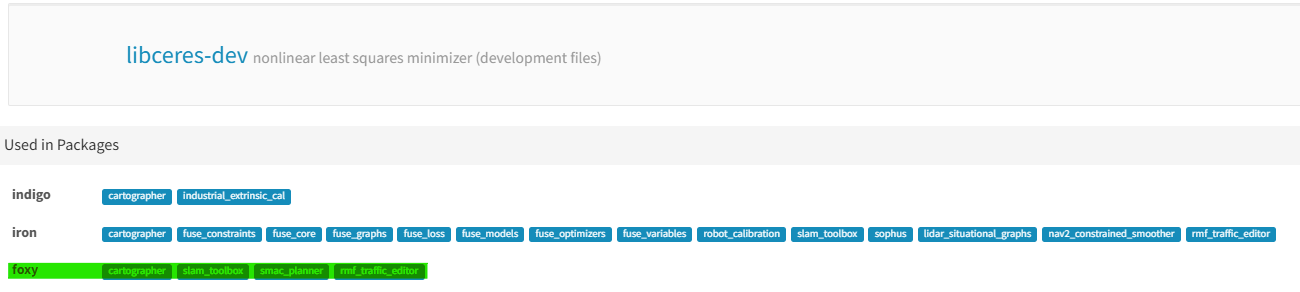
libceres-dev는 nonlinear least squares minimizer(ceres solver)이고 libceres-dev를 의존하는 패키지에 cartographer, slam_toolbox, smac_planner가 모두 들어가 있었다.
dawgs_nx@dawgs:~/dawgs_f1tenth/slam_dawgs$ sudo apt install libceres1 libceres-dev
Reading package lists... Done
Building dependency tree
Reading state information... Done
Package libceres-dev is not available, but is referred to by another package.
This may mean that the package is missing, has been obsoleted, or
is only available from another source

Package libceres1 is not available, but is referred to by another package.
This may mean that the package is missing, has been obsoleted, or
is only available from another source

E: Package 'libceres1' has no installation candidate
E: Package 'libceres-dev' has no installation candidate
진짜 문제는 libceres1과 libceres-dev를 설치할 수 없다고 말했다. apt가 패키지를 받아오는 저장소에 libceres가 없을 수 있다고 생각해서 apt list에서 추가했지만 PPA 저장소에도 찾을 수 없었다.
dawgs_nx@dawgs:~/dawgs_f1tenth/slam_dawgs$ sudo apt update
Hit:1 https://repo.download.nvidia.com/jetson/common r35.5 InRelease
Hit:2 http://packages.ros.org/ros/ubuntu focal InRelease
Hit:3 https://repo.download.nvidia.com/jetson/t194 r35.5 InRelease
Hit:4 http://ports.ubuntu.com/ubuntu-ports focal InRelease
Ign:5 http://ppa.launchpad.net/mikeferguson/ceres-solver/ubuntu focal InRelease
Hit:6 http://packages.ros.org/ros2/ubuntu focal InRelease
Hit:7 https://repo.download.nvidia.com/jetson/ffmpeg r35.5 InRelease
Hit:8 http://ports.ubuntu.com/ubuntu-ports focal-security InRelease
Err:9 http://ppa.launchpad.net/mikeferguson/ceres-solver/ubuntu focal Release
  404  Not Found [IP: 185.125.190.80 80]
Reading package lists... Done
E: The repository 'http://ppa.launchpad.net/mikeferguson/ceres-solver/ubuntu focal Release' does not have a Release file.
N: Updating from such a repository can't be done securely, and is therefore disabled by default.
N: See apt-secure(8) manpage for repository creation and user configuration details.
dawgs_nx@dawgs:~/dawgs_f1tenth/slam_dawgs$ sudo add-apt-repository -r ppa:mikeferguson/ceres-slover
Cannot add PPA: 'ppa:~mikeferguson/ubuntu/ceres-slover'.
The user named '~mikeferguson' has no PPA named 'ubuntu/ceres-slover'
Please choose from the following available PPAs:
 * 'ceres-solver':  Ceres Solver
dawgs_nx@dawgs:~/dawgs_f1tenth/slam_dawgs$ sudo apt update
dawgs_nx@dawgs:~/dawgs_f1tenth/slam_dawgs$ ls /etc/apt/sources.list.d
mikeferguson-ubuntu-ceres-solver-focal.list  ros-latest.list
nvidia-l4t-apt-source.list                   ros-latest.list.save
nvidia-l4t-apt-source.list.save              vscode.list
ros2.list                                    vscode.list.save
ros2.list.save
dawgs_nx@dawgs:~/dawgs_f1tenth/slam_dawgs$ sudo rm -rf /etc/apt/sources.list.d/mikeferguson-ubuntu-ceres-solver-focal.list
apt 저장소가 ros2가 아닌 부분이 조금 이상해서 ros를 그냥 지워버렸다. ros가 계속 있어야 하는 거였으면 ros를 깔끔하게 지워버리고 다시 설치하는 것도 방법이 되겠다. ros-latest도 ros2와 겹치길래 지워버렸다. (이전에 ROS1 noetic을 설치했던 게 남았다고 생각해서)
dawgs_nx@dawgs:~/dawgs_f1tenth$ sudo apt-get update
Hit:1 https://repo.download.nvidia.com/jetson/common r35.5 InRelease
Hit:2 https://repo.download.nvidia.com/jetson/t194 r35.5 InRelease
Hit:3 http://packages.ros.org/ros2/ubuntu focal InRelease
Hit:4 http://ports.ubuntu.com/ubuntu-ports focal InRelease
Hit:5 https://repo.download.nvidia.com/jetson/ffmpeg r35.5 InRelease
Hit:6 http://ports.ubuntu.com/ubuntu-ports focal-security InRelease
Reading package lists... Done
W: Target Packages (main/binary-arm64/Packages) is configured multiple times in /etc/apt/sources.list.d/ros-latest.list:1 and /etc/apt/sources.list.d/ros2.list:1
W: Target Packages (main/binary-all/Packages) is configured multiple times in /etc/apt/sources.list.d/ros-latest.list:1 and /etc/apt/sources.list.d/ros2.list:1
W: Target Translations (main/i18n/Translation-en_US) is configured multiple times in /etc/apt/sources.list.d/ros-latest.list:1 and /etc/apt/sources.list.d/ros2.list:1
W: Target Translations (main/i18n/Translation-en) is configured multiple times in /etc/apt/sources.list.d/ros-latest.list:1 and /etc/apt/sources.list.d/ros2.list:1
W: Target DEP-11 (main/dep11/Components-arm64.yml) is configured multiple times in /etc/apt/sources.list.d/ros-latest.list:1 and /etc/apt/sources.list.d/ros2.list:1
W: Target DEP-11 (main/dep11/Components-all.yml) is configured multiple times in /etc/apt/sources.list.d/ros-latest.list:1 and /etc/apt/sources.list.d/ros2.list:1
W: Target DEP-11-icons-small (main/dep11/icons-48x48.tar) is configured multiple times in /etc/apt/sources.list.d/ros-latest.list:1 and /etc/apt/sources.list.d/ros2.list:1
W: Target DEP-11-icons (main/dep11/icons-64x64.tar) is configured multiple times in /etc/apt/sources.list.d/ros-latest.list:1 and /etc/apt/sources.list.d/ros2.list:1
W: Target DEP-11-icons-hidpi (main/dep11/icons-64x64@2.tar) is configured multiple times in /etc/apt/sources.list.d/ros-latest.list:1 and /etc/apt/sources.list.d/ros2.list:1
W: Target Packages (main/binary-arm64/Packages) is configured multiple times in /etc/apt/sources.list.d/ros-latest.list:1 and /etc/apt/sources.list.d/ros2.list:1
W: Target Packages (main/binary-all/Packages) is configured multiple times in /etc/apt/sources.list.d/ros-latest.list:1 and /etc/apt/sources.list.d/ros2.list:1
W: Target Translations (main/i18n/Translation-en_US) is configured multiple times in /etc/apt/sources.list.d/ros-latest.list:1 and /etc/apt/sources.list.d/ros2.list:1
W: Target Translations (main/i18n/Translation-en) is configured multiple times in /etc/apt/sources.list.d/ros-latest.list:1 and /etc/apt/sources.list.d/ros2.list:1
W: Target DEP-11 (main/dep11/Components-arm64.yml) is configured multiple times in /etc/apt/sources.list.d/ros-latest.list:1 and /etc/apt/sources.list.d/ros2.list:1
W: Target DEP-11 (main/dep11/Components-all.yml) is configured multiple times in /etc/apt/sources.list.d/ros-latest.list:1 and /etc/apt/sources.list.d/ros2.list:1
W: Target DEP-11-icons-small (main/dep11/icons-48x48.tar) is configured multiple times in /etc/apt/sources.list.d/ros-latest.list:1 and /etc/apt/sources.list.d/ros2.list:1
W: Target DEP-11-icons (main/dep11/icons-64x64.tar) is configured multiple times in /etc/apt/sources.list.d/ros-latest.list:1 and /etc/apt/sources.list.d/ros2.list:1
W: Target DEP-11-icons-hidpi (main/dep11/icons-64x64@2.tar) is configured multiple times in /etc/apt/sources.list.d/ros-latest.list:1 and /etc/apt/sources.list.d/ros2.list:1
dawgs_nx@dawgs:~/dawgs_f1tenth$ sudo rm -f /etc/apt/sources.list.d/ros-latest.list
dawgs_nx@dawgs:~/dawgs_f1tenth$ sudo apt-get update
Hit:1 https://repo.download.nvidia.com/jetson/common r35.5 InRelease
Hit:2 http://packages.ros.org/ros2/ubuntu focal InRelease
Hit:3 https://repo.download.nvidia.com/jetson/t194 r35.5 InRelease
Hit:4 http://ports.ubuntu.com/ubuntu-ports focal InRelease
Hit:5 https://repo.download.nvidia.com/jetson/ffmpeg r35.5 InRelease
Hit:6 http://ports.ubuntu.com/ubuntu-ports focal-security InRelease
Reading package lists... Done
aptitude로 패키지를 받으려고 하는 것도 실패했고 아직 libceres를 설치하지 못했다.
잘했던 부분
1. libceres를 잘 파고 들었다.(물론 해결은 못했지만)
아쉬웠던 부분
1. apt가 저장소에서 패키지를 어떻게 불러오는지 잘 몰랐다.
참고자료
1. Cartographer ROS: https://google-cartographer-ros.readthedocs.io/en/latest/index.html
2. Github slam_toolbox: SteveMacenski/slam_toolbox: Slam Toolbox for lifelong mapping and localization in potentially massive maps with ROS
3. libceres-dev에 의존하는 패키지들: rosdep System Dependency: libceres-dev
4. libceres PPA로 받는 방법: Ceres Package? - Packaging and Release Management - ROS Discourse
5. aptitude로 패키지를 받는 방법: apt - What does "Package <package> has no installation candidate" mean? - Ask Ubuntu
'작업 일지 > F1Tenth' 카테고리의 다른 글
| [작업 일지] f1tenth lab5.SLAM and pure pursuit (0) | 2025.02.06 |
|---|---|
| [작업 일지] f1tenth lab5.SLAM and pure pursuit (0) | 2025.01.26 |
| [작업 일지] f1tenth lab4.follow the gap (0) | 2025.01.08 |
| [작업 일지] f1tenth labX.frenet_coordinate (0) | 2024.12.22 |
| [작업 일지] f1tenth lab3.wall_following (1) | 2024.12.14 |